
One morning, your profile is live, ranking, bringing in calls, and direction requests.
The next, it’s gone — or locked. No warning. No clear explanation.
A Google Business Profile (GBP) suspension is one of the most disruptive things that can happen to a local business online.
And yet it happens all the time — to legitimate businesses, not just spammy ones.
The good news: Suspensions are not permanent bans. Most profiles can be reinstated if you follow the right process.
GMB Suspension Recovery Guide 2026
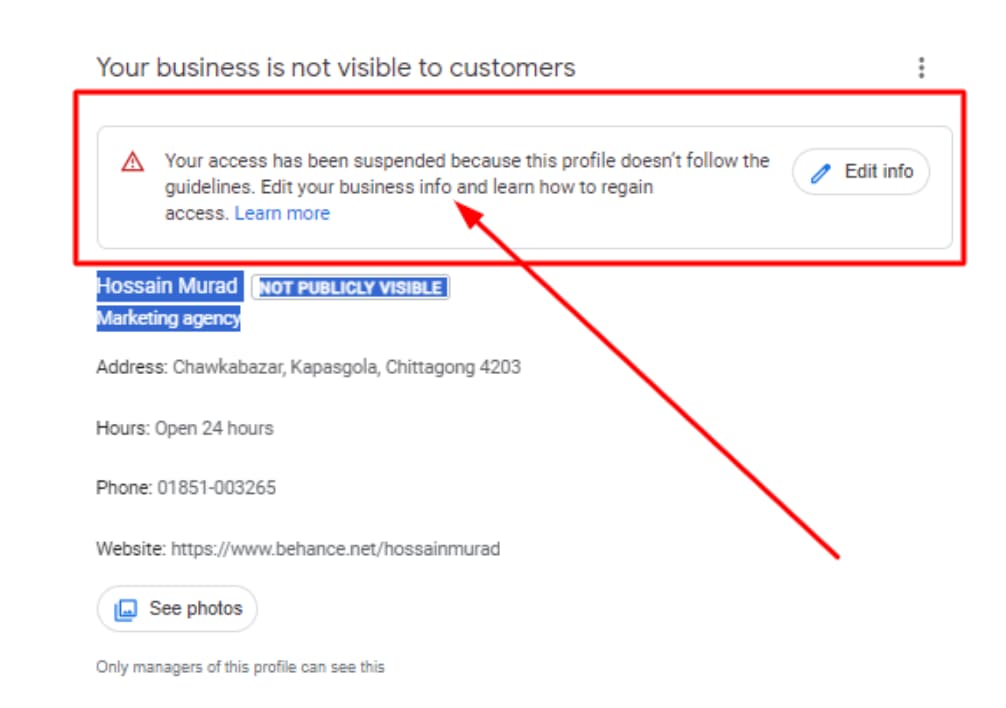
This GMB suspension recovery guide walks you through every step, clearly and in order, so you’re not guessing.
What Is a Google Business Profile Suspension?
When Google flags your profile for a policy violation – real or suspected – it either removes your listing from search and Maps or strips away your management access.
Either way, potential customers can no longer reliably find or trust your business online.
Google refers to this enforcement through its Business Profile guidelines, which every listed business is expected to follow.
The Two Types of GMB Suspensions
Before doing anything, identify which suspension type you’re dealing with.
Soft Suspension
Your listing is still visible in Google Maps and Search, but you’ve lost the ability to manage it. You can’t edit hours, respond to reviews, or post updates. The profile essentially becomes read-only for you.
This is typically triggered by something minor — an inconsistency in your business name, an address format issue, or a recent edit that Google flagged for review.
Hard Suspension
Your listing is removed entirely. It disappears from Maps and search results. Customers searching for your business by name may not find it at all.
Hard suspensions usually signal a more serious guideline violation — duplicate listings, a fake address, or activity that Google’s systems interpreted as manipulative. Recovery takes longer and requires more documentation.
Knowing which type you have determines how urgent your response needs to be and what the reinstatement path looks like.
Why Google Suspends GMB Listings?
Google doesn’t always tell you exactly why your profile was suspended. But the most common causes — pulled from Google’s published guidelines — include:
- Keyword stuffing in the business name — adding city names, services, or descriptors that aren’t part of your legal business name
- Using a virtual office, P.O. box, or coworking address without staffing it during stated business hours
- Creating multiple listings for the same location or business
- Choosing inaccurate categories that don’t reflect what your business actually does
- Suspicious review activity — soliciting fake reviews, reviewing competitors, or other manipulation
- Incomplete or inconsistent information — phone numbers, hours, or addresses that don’t match across platforms
If you’ve recently made changes to your profile before the suspension hit, that’s usually a strong clue about what triggered it.
Step-by-Step GMB Suspension Recovery Guide
Work through these steps in order. Skipping ahead before fixing the underlying issue is one of the most common reasons reinstatement requests get denied.
Step 1 — Read Google’s Business Profile Guidelines Carefully
Start at the source. Go through Google’s Business Profile policies line by line and compare them against your current listing.
Don’t assume you know what the problem is. A lot of suspensions come from violations the business owner didn’t realize were violations — like including a suite number in the business name field, or listing a service-area business with a physical address that doesn’t belong to them.
Step 2 — Fix Every Problem Before You Submit Anything
This is where most people rush and get rejected.
Make every correction before you touch the reinstatement form. That includes:
- Business name: Use your legal business name only. No added cities, keywords, or service descriptions.
- Address: Must be a real, staffed, publicly accessible location. Google’s address guidelines are specific about what qualifies. Virtual offices and mail-forwarding services only qualify if the address has on-site staff during listed hours.
- Categories: Choose the most accurate primary category for what your business does. Use secondary categories sparingly and only where relevant.
- Phone and website: Make sure these match what’s on your actual website and other verified directories.
- Business hours: List accurate hours. If you’re closed on certain days, mark them closed rather than leaving them blank.
Step 3 — Collect Documents That Prove Your Business Is Real
For hard suspensions, especially, Google will likely ask for verification documents. Get these ready before submitting your request:
- A utility bill (gas, electric, water) showing your business name and address
- A business license or certificate of incorporation
- Exterior photos of your location with visible signage
- Interior photos showing your workspace, equipment, staff, or branded materials
- A bank statement or tax document with your business name and address, if the above aren’t available
The more clearly your documents tie your business name to your physical address, the better. Scanned copies are fine; photos of documents work too, as long as they’re legible.
Step 4 — Submit the Reinstatement Request
Once your profile is corrected and your documents are in hand, go to Google’s Business Profile Reinstatement Form.
When filling it out:
- Explain what was wrong and what you fixed. Be specific, not vague.
- State clearly why your business is legitimate — physical location, years operating, and how customers reach you.
- Attach your supporting documents. Don’t leave this section empty.
Tone matters here. Be factual and direct. Google reviewers process a lot of requests — clear, honest, complete submissions move faster than emotional or vague ones.
Step 5 — Wait (Without Spamming the Queue)
Most reinstatement decisions come back within 3 to 7 business days for soft suspensions. Hard suspensions can take 2 to 4 weeks, sometimes longer for edge cases.
During this window:
- Do not submit the form again. Duplicate submissions don’t speed up the review — they can actually slow it down or create confusion in the queue.
- Check your email daily. Google communicates through the email tied to your Google account, not the phone number on your profile.
Step 6 — Respond If Google Asks for More Information
Sometimes Google’s review team will send a follow-up request for additional documentation or clarification. Treat this as a good sign — it means a real person is reviewing your case.
Respond promptly. Provide exactly what they ask for, with no extras that could muddy the picture. Delays or incomplete replies at this stage are a common reason cases close without reinstatement.
Step 7 — Harden Your Profile After Reinstatement
Once you’re back, don’t treat it as a clean slate with no risk. A reinstated profile gets scrutinized more closely in the months that follow.
- Keep your NAP data (name, address, phone) consistent across your website, Google profile, and all directories
- Upload fresh photos regularly — Google’s own data shows profiles with current photos get more clicks
- Collect genuine reviews through ethical outreach. Do not incentivize reviews or use third-party review services.
- Stay current with Google’s policy updates. The guidelines change, and what was acceptable last year sometimes isn’t now.
How Long Does GMB Suspension Recovery Actually Take?
There’s no fixed timeline, but realistic expectations help.
| Suspension Type | Typical Recovery Time |
|---|---|
| Soft suspension | 3–7 business days after correction |
| Hard suspension | 2–4 weeks, sometimes longer |
| Repeat violations | May take longer or require additional review |
Businesses with clean documentation, a consistent online presence, and a straightforward profile tend to recover fastest.
Cases involving duplicate listings, address discrepancies, or previous suspensions take longer.
When to Get Professional Help?
If your first reinstatement request gets denied, or if your business operates in a category that Google scrutinizes heavily – healthcare, legal services, real estate, locksmiths, home services – it may be worth working with a local SEO specialist who handles GBP reinstatement cases regularly.
They understand which documents carry weight, how to phrase the submission, and how to address follow-up queries from Google’s review team.
It’s not always necessary, but it’s worth considering if you’ve already tried once and been rejected.
FAQs
- Can a suspended Google Business Profile be permanently deleted?
Not automatically. A suspension restricts or removes your visibility but doesn’t delete the profile. However, if reinstatement requests are repeatedly rejected or the profile is found to be fraudulent, Google can remove it permanently. Legitimate businesses with clean documentation rarely face that outcome.
- What happens to my reviews during a hard suspension?
Your reviews are typically preserved and will reappear once your profile is reinstated. They don’t get deleted by a suspension alone.
- Can I create a new GMB listing while my old one is suspended?
No. Creating a new listing for the same business while your original is under review is a direct policy violation and can result in both listings being rejected. Wait for the reinstatement process to run its course.
- How do I check if my business profile is suspended?
Search for your business on Google Maps. If the listing has disappeared, or if you log into Google Business Profile and see a warning banner or restricted access, your profile is likely suspended.
- Is there a phone number to call Google for GMB reinstatement?
Google does have a Business Profile support page where you can request a callback or chat session. However, reinstatement decisions are made through the form-based process, not over the phone. Support can help you navigate the process, but can’t override the review team.
- What’s the difference between a suspended profile and a pending verification?
A pending verification means your profile exists but hasn’t been verified yet — it’s not a suspension. A suspension is an active restriction on a previously active or submitted profile. The recovery process is different for each.
The Short Version
Your profile can be recovered. Clean up the listing completely before you submit anything.
Document your business’s legitimacy. Submit one clear, honest reinstatement request with supporting files. Respond fast if Google follows up.
That’s the process. It’s not complicated, but it requires patience and thoroughness — two things that matter a lot when you’re trying to recover from something that affects your local search visibility every day it’s not resolved.
Also Check: